
The HMI software is what builds the control screen an operator looks at and touches on SENVAS Touch. It comes in two halves: SENVAS Designer, where the screen is drawn, and SENVAS Runtime, which runs it on the device. It is not just a drawing tool — it talks to the plant floor, records what happens, raises alarms, and executes control logic, which is what an industrial HMI/SCADA package has to do.
In our post about the management launcher we noted that the operator-facing HMI app is a separate program. This is the software that builds that app. The launcher (②) runs underneath, and the HMI (①) draws the plant floor on top of it.
Industrial HMI core capabilities
The core capabilities cover the range of jobs a plant floor expects from an HMI.
Talking to the field — communication
- Multiple protocols — Modbus (RTU and TCP), MQTT, MC (Mitsubishi), and CNet (LS Electric) connect it to PLCs, sensors, inverters, and upstream servers.
- Real-time polling — it reads from several machines on a cycle and pushes commands back out. Physically it attaches over RS-485 (3 channels), RS-232, and Ethernet, and it manages the connection state of each machine.
Watching and recording — monitoring and history
- Live monitoring — values land on the screen without a refresh through data binding.
- Historical logging — operation records, alarms, and samples accumulate in an on-device SQLite database. Schema versioning (migrations) is built in, so history keeps stacking up safely on devices already in the field.
- Trend analysis — live trend charts and historical time-series charts show how a value has been moving.
Alerting and controlling — alarms and logic
- Alarms and events — each alarm is recorded with a timestamp, level, source, and message, then filtered and acknowledged from a table.
- Control logic — a cyclic loop watches thresholds, holds interlocks, and issues automatic commands on condition (“stop automatically when the limit is exceeded”, for example).
- Signal conditioning — contact chatter removal, sensor value smoothing, and range scaling keep noisy field signals usable.
Storing and protecting — persistence and security
- Settings and recipes — configuration values and recipes are saved and reloaded.
- Encryption — sensitive values are protected with AES.
- Precise timing — a high-resolution millisecond timer drives accurate cyclic processing.
SENVAS Designer — where the screen is drawn
SENVAS Designer is the PC application where screens are designed.
- Drag and drop with live preview — drop components onto the canvas and preview exactly what you drew.
- AI-assisted design — connect an AI such as Claude over MCP and build screens and logic through conversation, down to generating and checking the code skeleton. It takes the sting out of starting from an empty canvas.
- Reusable components and master screens — package the groups you use often and reuse them like parts, and build the common frame (title bar, sidebar, footer) once to apply across every page.
- Proven templates and themes — start from working samples such as temperature control, water treatment, BESS (energy storage), and data centers, with color and font themes kept per project.
Over a hundred components to draw with
The HMI component library is broad.
- Value displays and lamps — numeric, text, and state values, LED indicators
- Inputs and switches — numeric/text/combo inputs, sliders and knobs, check and radio, toggle switches
- Buttons — push buttons, lamp buttons, button groups
- Data grids — sortable, selectable, summarizable tables (11 column types)
- Charts and trends — line, bar, live trend, sparkline, and pie charts
- Gauges and progress — analog gauges and meters, progress bars
- Process diagrams — P&ID-style screens from pump, valve, tank, and pipe symbols
- Shapes and drawing — rectangles, circles, lines, curves, and other vector shapes
- Navigation and layout — tab navigators, sidebars, grid layouts
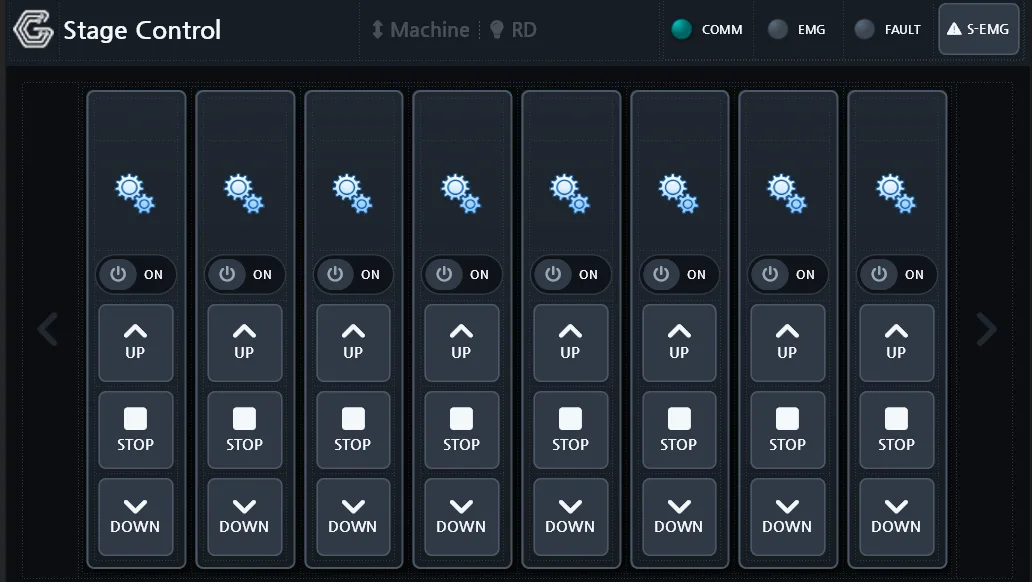 A real screen assembled from those components — an 8-axis stage control HMI built in SENVAS Designer. The header, status lamps, and buttons are all components. (Actual Designer capture.)
SENVAS Runtime — running it on the device
SENVAS Runtime is what executes the screen you build, on the device.
- Native high-speed rendering — it is built on Skia, the graphics engine behind Chrome and Flutter, so even a small device like a Raspberry Pi gets smooth screens and fast touch response.
- Full-screen operation — the launcher brings the runtime up full screen, so the operator sees nothing but the control screen.
- Automatic updates — it checks for new versions in the background and notifies without interrupting work.
Build it, deploy it, run it — the Designer to Runtime flow
flowchart LR
    Designer["SENVAS Designer · PC authoring (AI-assisted)"]
    Designer -->|"deploy design"| Runtime["SENVAS Runtime · on-device · Skia rendering"]
    Runtime <-->|"Modbus·MQTT·MC·CNet"| Field["PLC · sensors · servers"]
    Runtime --> Log["history · alarms · on-device DB"]
    Launcher["Touch management launcher"] -. launches full screen .-> Runtime
You build the screen on a PC (with AI help if you want it) and push it to the device. The launcher brings the runtime up full screen, and the runtime talks to the field while it monitors, records, alarms, and controls.
SENVAS Designer and Runtime summary
| Capability | What it covers |
|---|---|
| Communication | Modbus · MQTT · MC (Mitsubishi) · CNet (LS Electric) over RS-485/232 and Ethernet |
| Monitoring and history | Live binding, operation/alarm/sample records in an on-device SQLite DB, trends |
| Alarms and logic | Alarm and event recording and acknowledgement, cyclic control logic (thresholds, interlocks, automatic commands) |
| Signal conditioning | Chatter removal · sensor smoothing · range scaling |
| Persistence and security | Settings and recipe storage, AES encryption, high-resolution timer |
| Authoring (Designer) | Drag and drop, AI-assisted design, reusable components, 100+ components |
| Execution (Runtime) | Skia native rendering, full screen, automatic updates |
To put it plainly, the HMI software (①) is the half that builds and runs the operating screens that watch, record, and control the plant floor, while the management launcher (②) is the half that lays the foundation and handles management, including remote access. Together they make up SENVAS Touch.
The HMI software is drawn in SENVAS Designer and run by SENVAS Runtime, and between them it handles communication, history, alarms and control.
Contact
- Email: [email protected]
- Instagram: https://www.instagram.com/going.sen/
- Website: https://intosen.com/kr/consult/
Comments
Enter a nickname to leave a comment, or sign in with Google or GitHub.