
The third game - a joystick vertical scrolling shooter
The beer game cabinet got blackjack in Part 3, and we wrote that it was “the moment a machine becomes a platform.” Time to back that up. The third game is a vertical scrolling shooter.
Once again the input device chose the game. The lever produced the beer game and physical buttons produced blackjack; this time an analog joystick came first. Given an input that moves freely in all four directions, a shooter was the natural answer. Our reference was Dragon Flight, a Korean national favorite - vertical scrolling, auto fire, pickups that make you stronger, keep going until you die.
The picture we wanted was clear: climbing endlessly into a night sky, dodging waves of enemies with the joystick, sweeping them up with gunfire, growing stronger on pickups, and clearing the screen with a bomb when things get dangerous - a short, sharp arcade shooter that makes you say “one more round.” The original only moves left and right, but having fitted a joystick there was no reason not to use vertical movement too.
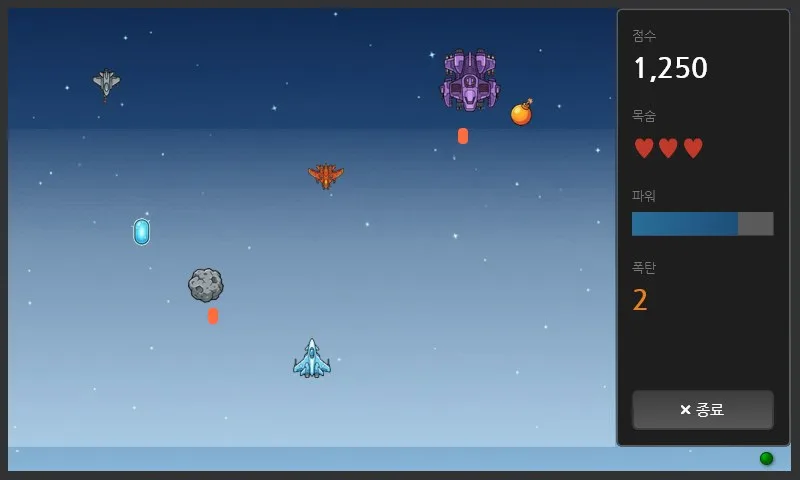
Climbing the night sky, shooting enemies. Score, lives, power, and bombs are on the right panel. The joystick moves the ship and the gun fires automatically.
There were no memory addresses to begin with
Memory addresses, not game logic, were what blocked us first.
In this cabinet the controller computes the game and the screen draws it. The two are linked by standard communication, and the address range the screen can read is fixed. That range was already full of beer and blackjack. What was left had been split into two chunks, so there was no contiguous space to read the ship, enemy, and pickup coordinates in one go - and a shooter has to send those every moment.
We moved the boundary between the read area and the write area to widen the space. That came at a price: every command address in two perfectly working games had to move. Start, exit, betting - all of those buttons shift to different addresses.
So we kept the order strict. We did the address move first, then, without touching a single line of the shooter, played one complete round of beer and one of blackjack. Only after confirming both games were intact did we start work on the new one. Doing them mixed together would have made it impossible to isolate the cause of any problem.
Saving bullet coordinates broke cause and effect
Coordinate memory was tight, so we went looking for things to save. What stood out was our own bullets.
The gun fires automatically. The firing interval is fixed, so the screen can draw the trajectories from the same rule. That means there is no need to send bullet coordinates at all. The controller only reports “which shot number this is,” and hit detection happens internally. We saved over twenty slots.
The problem was that we did the hit detection at the moment of firing. Bullet flight time was zero, so an enemy at the top of the screen exploded the instant the trigger fired. On screen the bullet had only just left, and the enemy was already gone. To the player it reads as “it exploded without the bullet ever reaching it.” The furthest enemies died a full 0.4 seconds early.
The fix was simple. We flew the bullets for real, but only inside the controller. The coordinates still are not sent, so the savings stay, and the hit happens when the bullet arrives. We matched the drawing speed on the screen to the internal flight speed so the time axis lines up too.
Sprite sheets, back to the generative AI
The sprite sheets used the same method as the bartender in Part 4: open a browser and commission them from a generative AI. Asking within one conversation keeps the art style consistent.
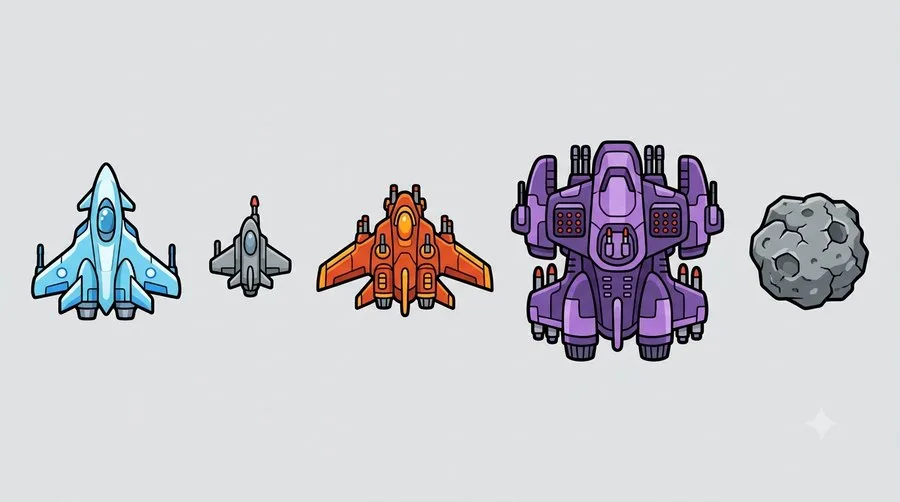
The sheet we got by requesting five in one go. Player ship, small, medium, and large enemies, and an indestructible rock. Ordering them separately produces five different art styles.

Power-up capsule, bomb, and a four-stage explosion. Specifying a flat light gray background makes it clean to strip to transparency later.
Two things caught us this time.
First, the initial request was refused. “I am a language model and I am not designed to help with that.” We nearly assumed the prompt was at fault and started rewording, but looking closely at the screen revealed a different cause: “Demand for Pro is currently high. A different model was used for this response.” The model that can generate images was busy, a text-only model substituted for it, and that model answered that it cannot draw. Specifying the model again produced the images immediately. Had we taken the refusal text at face value and edited the prompt, we would have been lost in the wrong place entirely.
Second, every enemy ship was drawn facing up. We had clearly written “top view, facing down,” and they came out pointing the same way as the player ship. Enemies descending while facing upward makes no sense as a game. Rather than reorder, we rotated only the enemy ships 180 degrees in post-processing. One line of code was faster than explaining it again to the AI.
Enemy fall speed was far too fast
Enemy fall speed was terrifying the moment we played it. Measured, a straight-line enemy crossed the screen in 2.2 seconds. There is no time to decide whether to dodge or shoot. Standing still cost all three lives in 10 seconds.
Halving the speed hit a small wall. Speed was an integer, “pixels per tick,” so there was no way to express 1.5 as half of 3. We applied the fractional accumulation already used for ship movement to the enemies as well - accumulate in units of 0.1 pixels each tick and move only when the total passes one pixel.
The choppiness came from the coordinate update interval
The ship’s movement looked choppy, and that was the next thing to stand out once the speed was fixed.
The controller moves the ship every 20 milliseconds, that is 50 times per second. But the screen received those coordinates far less often. The screen draws 60 times a second while the position updated only about 20 times a second, so it drew three times at the same spot and then jumped.
We attacked it from two directions. We shortened the communication interval so coordinates arrive more often, and had the screen interpolate smoothly across whatever gap remained. Measured, the coordinates jump 7 pixels every 32 milliseconds, and those 7 pixels get spread across the frames between.
We headed off one trap here. Enemy slots are reused. Applying interpolation naively makes a newly spawned enemy appear to fly out of the spot where one just died. We added an exception so that when a slot changes owner, it snaps to position instead of interpolating.
Difficulty: enemy speed and score multipliers
Difficulty became the obvious next question once the speed was set - this would vary from person to person. The settings screen already had difficulty levels (easy, normal, hard) for the beer game. Rather than build something new, we wired that to the shooter’s speed. One difficulty switch on an arcade machine feels natural anyway.
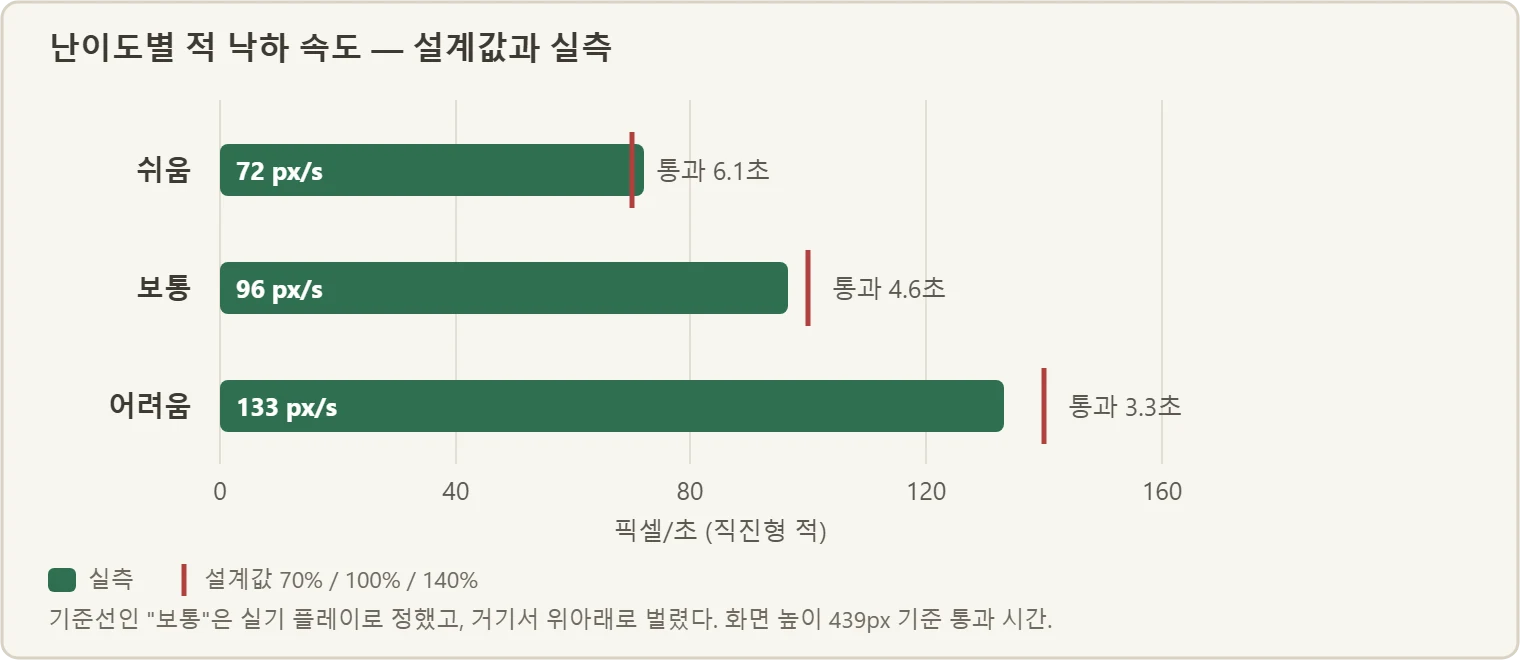
Values measured on the real machine. The hand-tuned “normal” sits on the baseline and the others spread above and below it.
We made the score scale with difficulty too, so a record set on the hard setting deserves its place on the leaderboard. Integer division caught us once here. Survival score was 1 point per second, and multiplying by easy difficulty’s 70% truncates to 0 points. The survival score disappears entirely. On hard, 1 point stayed 1 point no matter what multiplier was applied. Raising the unit to 10 points per second made the multiplier work properly on all three difficulties.
The measured result is the interesting part. Over 22 seconds, easy actually produced a higher score, despite the clearly lower multiplier. The reason is simple - slower enemies stay on screen longer, so there are more chances to shoot them down. Lowering the speed itself pushes the score up. That means making the leaderboard fair regardless of difficulty would require spreading the multipliers much further apart, or splitting the table entirely. We have not fixed that yet.
Bugs that build fine and only show up when you run them
This chapter had an unusual number of bugs that compile and build perfectly and only appear when you actually run them. A selection:
| Symptom | Cause |
|---|---|
| Enemies vanish the instant they spawn | Spawn y coordinate set negative, and memory that cannot hold negatives cleared it immediately |
| The game freezes after about 22 minutes | The accumulating timer overflow was never considered |
| Zigzag enemies move exactly like straight ones | The lateral period was set so short that it became a shiver, not movement |
| The bottom of the ship is clipped off screen | The play area height was set 24px too large |
| Communication did not get as fast as expected | We optimistically doubled the communication rate, a value the library structure cannot produce |
| The exit button does not exit | A game-state read was missing, so the shooter screen could not be left |
What they share is that static inspection does not catch them. No amount of rereading the code helps; you have to build and run it, or dig into the library source. The exit bug in particular would have been met after deployment with “wait, why can I not get out?” So this project takes execution, not a build, as the definition of done at every stage.
Still outstanding - the bomb button wiring
The bomb button does not work. It is a switch on the joystick that clears the enemies on screen, but no signal arrives through the wiring. The logic is fine - we confirmed the bomb count decrements.
Trying to verify it taught us one more thing. To simulate the switch being pressed in software, we forced a value - and that value happened to be one the program recalculates every moment. The forced value and the calculation kept overwriting each other, the value oscillated, and “pressed and released” effectively happened dozens of times per second, so two bombs went off at once. To simulate something, you have to touch the ingredients, not the calculated result.
Recap: lessons from building the shooter
- Look at where the cost of saved space lands. Not sending bullet coordinates saved memory but broke cause and effect. Saving is fine, as long as you know what you are giving up.
- Do not take a refusal message at face value. When the AI answered “I cannot do that,” the real reason was in a notice in the corner of the screen.
- Smoothness is about update interval, not frame count. Drawing at 60fps with coordinates arriving at 20fps looks like 20fps.
- Integer division quietly produces zero on small numbers. 70% of 1 point is 0 points.
- Passing the build is not done. There was an unusual number of bugs that compiled and built cleanly and only surfaced on execution. The definition of done is running it.
Whether you are saving memory or slowing enemies down, the definition of done is running it on the real machine, not passing the build.
Next up
We thought it was time to tidy up the cabinet, but before that we built one more game out of the same parts. Game four is Part 7, translating “this is not fun” into numbers, through fishing. The cabinet story comes after that.
Dragon Flight, our reference, is the national vertical scrolling shooter released in 2012 by Next Floor (now LINE Games). (reference) The ship artwork, pickup artwork, and code in this post are entirely original; only the play style was referenced.
Earlier chapters: Parts 1 through 5.
Contact
- Email: [email protected]
- Instagram: https://www.instagram.com/going.sen/
- Website: https://intosen.com/kr/consult/
Comments
Enter a nickname to leave a comment, or sign in with Google or GitHub.