
Once the sensors were covered and the radio was working, the next question arrived: how many devices can we attach?
The first structure was the simple one. Each device measures on its own timer and transmits. It is the easiest thing to build. It is also pure ALOHA — nobody knows when anybody else is talking, so there is no way to prevent collisions. To keep the collision rate under 1% with 30 devices, the transmit interval had to stretch to five minutes.
Once every five minutes is too slow. So we inverted it.
Instead of letting devices speak on their own, the server calls them one at a time. With a single caller, two devices never talk at once in the first place.
Why you must not wait — the one-second downlink scheduler
Wait-for-reply polling was the natural way to write it: call, receive the reply, call the next device. And 30 devices took 42 seconds.
Measurement explained why.
| Segment | Time |
|---|---|
| Radio round trip itself | 466 ms |
| From the call to the reply | 1,444 ms |
| Difference | about 1 second |
That second is not propagation time. It is the wait created by the gateway emitting downlinks on a one-second scheduler. In a wait-for-reply design, that second accumulates once per device.
So we stopped waiting for replies. We keep calling at a fixed interval and pair up the replies as they arrive. That turns the second into a constant applied equally to every device, and a full round is determined only by the calling interval.
The interval cannot shrink without limit. Overlapping replies are collisions again, so it has to sit comfortably above the uplink airtime. For 30 devices we settled on a 1-second interval, which is a 30-second round.
LoRa devices that do not answer get a rest
Skipping devices that do not answer was one more condition we added: a device that is not answering must not be called forever.
A device that has been power-cycled needs to reconnect to the gateway, and if we keep calling it in the meantime, the gateway transmitter stays busy and cannot take the join request. The more we call, the later it comes back.
So after a few missed calls, a device is left alone for a while and the poller moves on. In exchange, when word arrives that it has reconnected, we call it again immediately.
The downlink re-call interval has a floor, too
The gateway’s downlink slots have a minimum re-call interval — something shrinking the interval taught us. Calling the same device again after 6 seconds failed; 10 seconds went through.
We did not find that in any document — we found it by changing the value and observing. Details like this are usually undocumented, and the longer part is realizing that they are.
The MQTT uplink monitor — what is happening right now
The uplink monitor window exists to show what is going back and forth while polling runs.
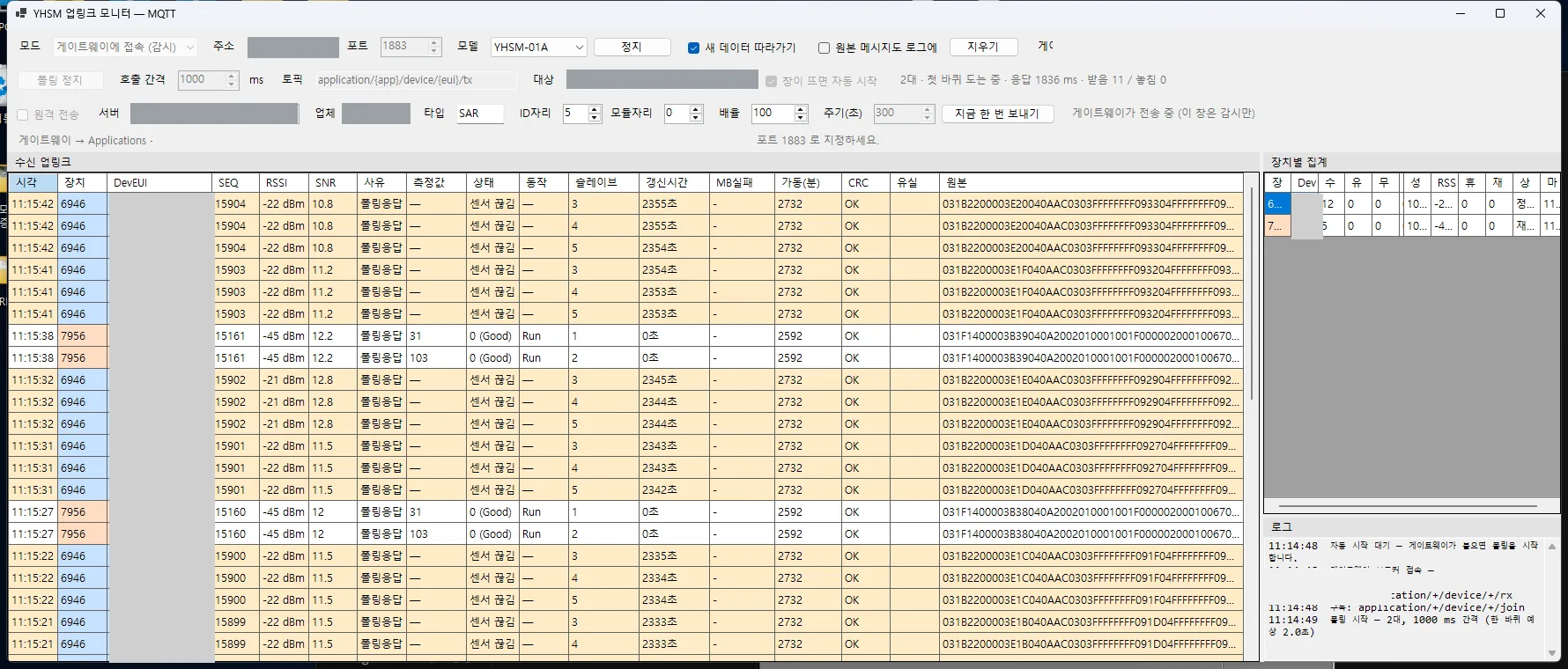
Received uplinks stack up in time order. Device, SEQ, RSSI, SNR, reason, measured value, slave, and CRC all sit on one line together with the raw payload, and per-device totals run in a separate panel on the right. (Device identifiers and the server address are masked.)
This screen caught a lot. The reason column records whether a frame is a poll response or an
autonomous transmission, and the slave column shows which sensor answered. Even in the screenshot
above, one device is reporting normal values while another shows sensor disconnected — the node
is alive, but the sensor beneath it is not answering. You can separate a radio problem from a sensor
problem by eye.
We implemented the broker ourselves as well. We did not want this one window to force the installation of a separate MQTT broker, and since all we actually needed was connect, publish, subscribe, and ping, doing it ourselves was the simpler path.
The node configuration tool — AT commands on a screen
LoRa node settings originally went in one AT command at a time: sensor count, baud rate, poll interval, timeout, and the keys used to attach to the gateway. Typing all of that by hand in the field is not realistic.
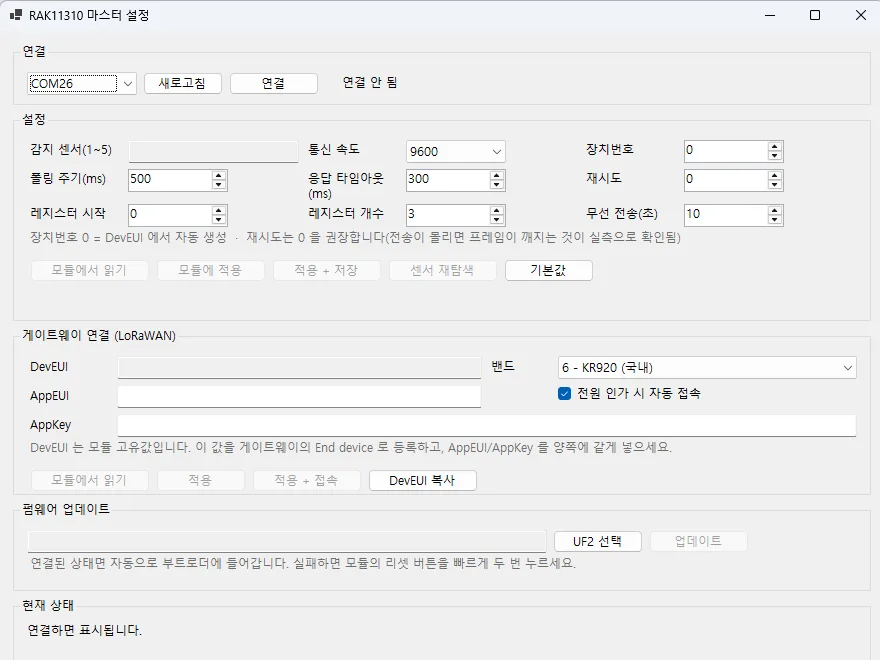
Connection, settings, gateway attachment, and firmware update on a single screen. (Shown with no device connected.)
Building it taught us three things.
One. Opening the port reboots the module. Opening the serial port toggles the control lines and resets the module. Which means that if you enter values and do not save them, they are gone on the next connection. Not knowing this leads to an endless loop of “I definitely entered that, why is it not there?”
Two. The slave ID is discovered, not configured. At first we had the user type in the slave ID. But in the field, nobody knows what ID a sensor is set to — the node scans and finds out. So we removed the input box and replaced it with a “detected sensors (1–5)” readout. Never ask the user for a value the user cannot determine.
Three. Flashing firmware does not need a button press. Normally you have to double-tap the reset button on the module to enter the bootloader. But this chip family drops into the bootloader when a port is opened and closed at a particular baud rate. Putting that into the tool means nobody has to open the enclosure on site.
The gateway management tool — why login kept failing
The gateway API management tool exists because clicking through the web UI for every change is also work, so we built a separate tool that drives it through the API. And login failed, over and over.
The username and password were correct, but we could not extract the auth token. Only after picking the response apart did we see it: this firmware returns the token under its own field name, not one of the common ones. We had only been looking for the common ones.
One thing to be careful about here: while groping around the API, accumulated login failures lock the gateway. The number of remaining attempts comes back in the response, and only after seeing it did we understand that this is a door you knock on carefully.
We held to one design rule. Read the whole radio configuration, replace only the fields you intend to change, and write it back. That is the only way settings this tool knows nothing about survive. For a tool that touches a gateway in production, this is not optional.
Calling at a fixed interval instead of waiting for each reply stops the one-second downlink wait from accumulating per device, and a 30-device round drops from 42 seconds to 30.
▶️ Next in this series — zero interference, and still impossible to assemble: Turning a working node into a product needed an enclosure. The interference check kept passing while assembly failed five times.
🔧 Previously: building a sensor without the hardware.
Contact
- Email: [email protected]
- Instagram: https://www.instagram.com/going.sen/
- Website: https://intosen.com/kr/consult/
Comments
Enter a nickname to leave a comment, or sign in with Google or GitHub.