
Part 3 got as far as writing the app, ladder and C# both. This part is about what happens to that app once it lands on a Raspberry Pi. The runtime story.
There are reasons people on the shop floor trust a PLC. It runs on a fixed period. It takes a new program without cutting power. Values survive a blackout. Power it up and it comes back on its own. One logic bug does not kill the controller. Say you built a PLC by putting .NET on a Raspberry Pi. These are exactly the points where people doubt you. I’d doubt it too.
So this part goes through how the runtime covers each of them. The resident process that receives an app and keeps running it, the cycle that holds 10 ms, isolating the user’s C#, swapping without stopping, and the actual boot sequence on real hardware. I put together one sample app for the purpose, and each section runs one piece of it.
The app we will run
First, what the app looks like. The product counter from Part 3 only does one thing, count, which is too narrow to show off the runtime side. So I wrote a new sample that spreads the features out.
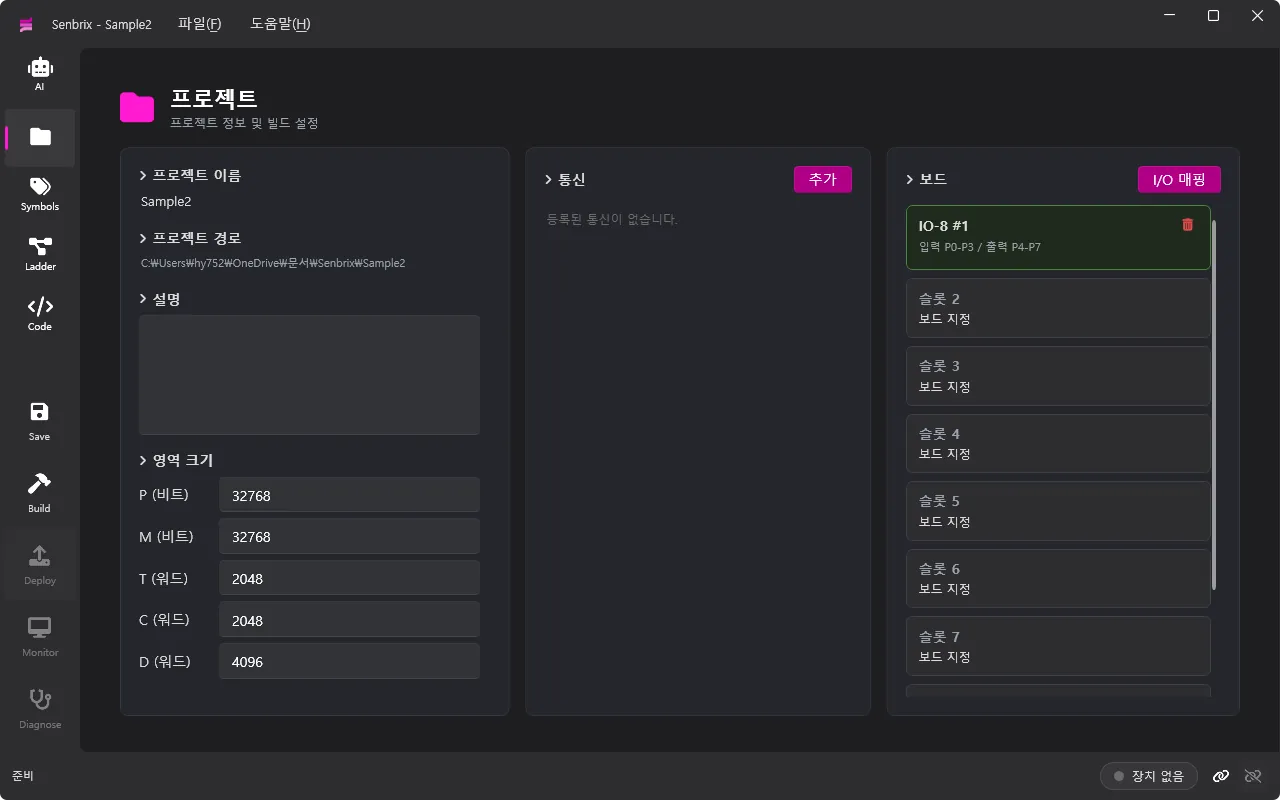
The board is a single IO-8 in slot 1. Inputs land on P0 to P3, outputs on P4 to P7. Four buttons and four lamps, in effect. Memory area sizes are the defaults and there is no communication.
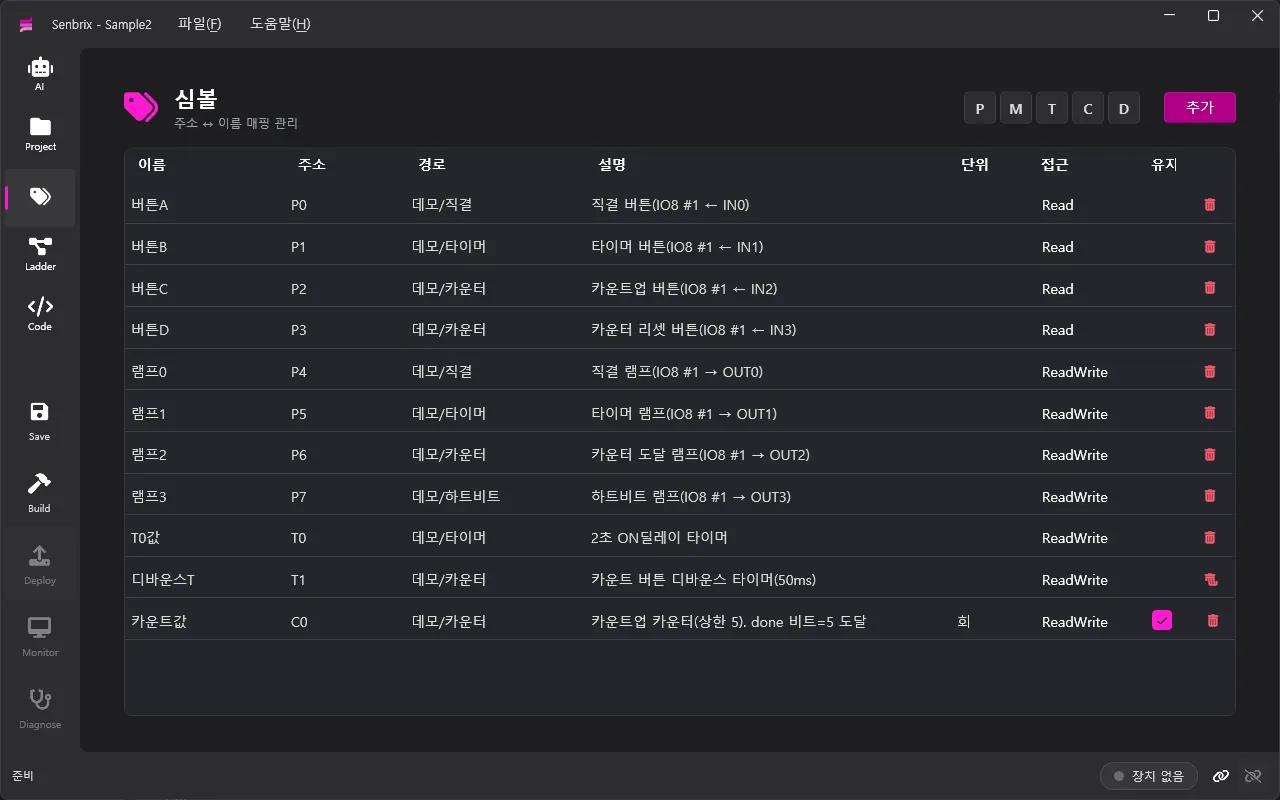
The symbols are 버튼A to 버튼D (buttons A to D, P0 to P3), 램프0 to 램프3 (lamps 0 to 3, P4 to P7), two timers (T0 and T1), and 카운트값 (the count value, C0). Only the count value has retain checked. What that one checkbox does, you will see in the last section.
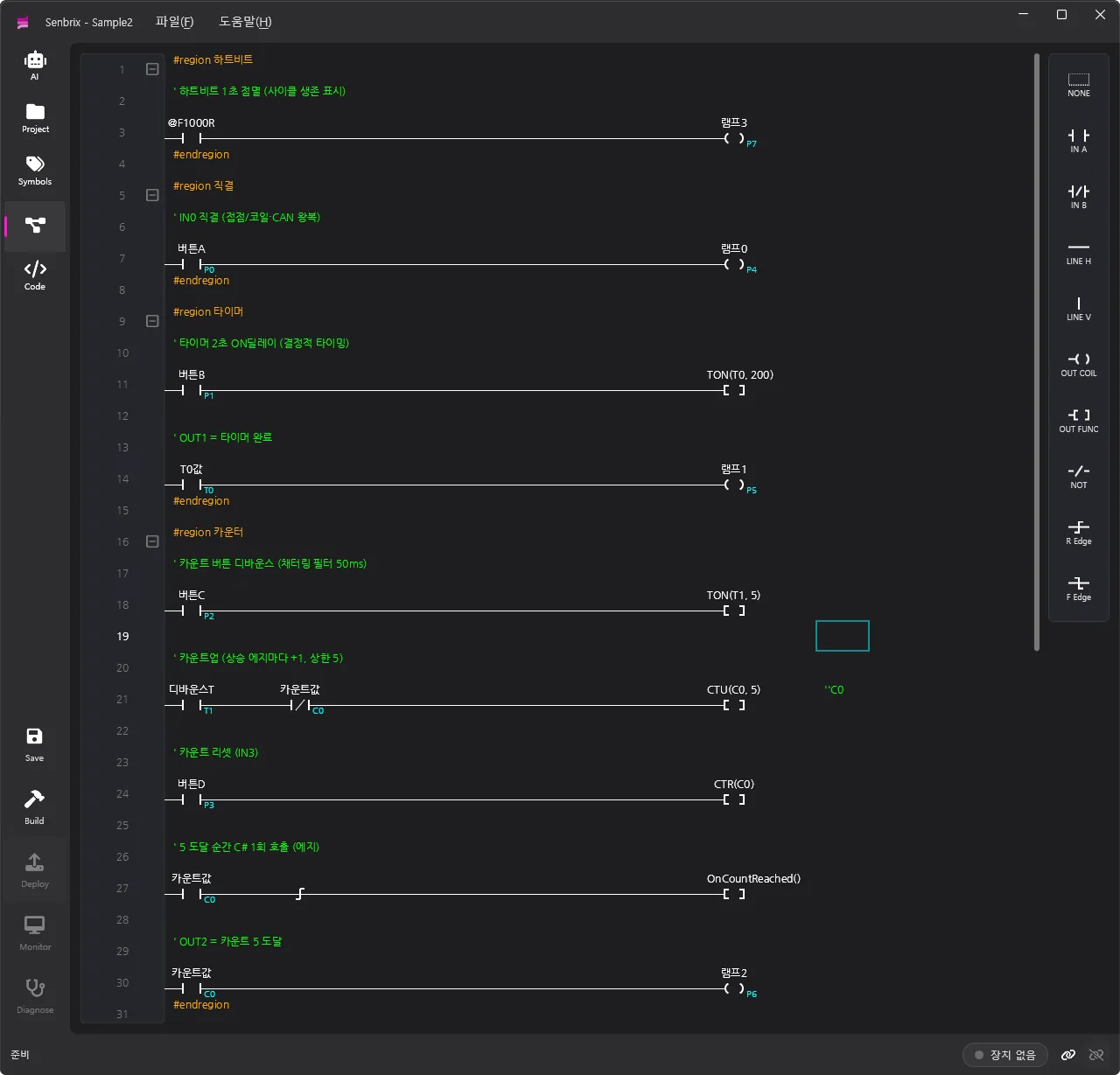
The ladder comes in four groups.
| Group | What it does | What it proves |
|---|---|---|
| Heartbeat | 램프3 blinks once a second | The cycle is alive |
| Direct | 버튼A → 램프0 | Input and output make the round trip |
| Timer | 버튼B for 2 s → 램프1 | Time is accurate |
| Counter | 버튼C five times → 램프2 plus a C# call, 버튼D resets | Ladder calls C#, values survive |
Each rung gets covered in the section that tells its story. The C# side is one function the counter calls. Nothing more.
The runtime stays, the app gets swapped
What runs on the Raspberry Pi is the runtime. One process built on ASP.NET Core stays up on the target the whole time. The app you deploy is not that process. It is cargo that gets loaded into it and pulled out again. The process belongs to the runtime, and the app runs on top of it.
Here is why I split it that way. The runtime does more than run the app. When the process comes up it opens four doors at once.
- Deploy (HTTP ): the editor uploads build output here.
- Monitor (TextComm ): the editor reads live values back from here.
- Discovery (mDNS): advertises the device name and ports.
- CAN bus: the I/O boards attach here.
These doors have to stay open while an app is being swapped. If the deploy door dies in the middle of uploading a new app, that is a problem. If the monitor drops just because the app changed, that is a problem too. So the process holds the doors and only the app comes and goes.
Four doors, but the work behind them is the same. What state are we in, what is this value, which point do I control. Write that query-and-control logic fresh for every door and they drift apart. So there is one access layer and every door calls only that. REST or TextComm, same layer, same answer.
An app’s lifetime starts over with every deployment, so a single adapter hooked onto the host lifetime catches those moments. At boot, if there is a deployment in the Apps folder, it starts automatically. At shutdown, it stops. Power comes on, the runtime comes up, and if an app was left there, it runs.
The sample app above builds to a single DLL, and that DLL is what gets loaded into this process and runs.
A deterministic 10 ms cycle
The core of the runtime is the scan loop. The deterministic ladder loop I drew in Part 2 is what actually runs here. One cycle goes in this order.
- Read communication inputs (
Load) - Take board inputs off the bus and put them in memory
- Advance the ladder tick
- Execute the ladder logic (
LadderLoop) - Push board outputs out
- Push communication outputs out
- If monitoring is on, hand over a value snapshot
Inputs gathered at the front of the cycle, outputs pushed at the back, same as before. Inputs do not change mid-execution, so the logic is predictable.
How the 10 ms is held is the key part. If you just wait 10 ms every cycle, then on a day when processing runs long the period slides a little at a time. Drift. So there is one Stopwatch measuring actual elapsed time. The next tick time gets bumped by 10 ms each step, and if elapsed has passed it, the loop catches up by however many ticks it is behind.
var elapsed = sw.ElapsedMilliseconds;
if (elapsed - nextTickMs > 1000) nextTickMs = elapsed - 10;  // too far behind: give up catching up
while (nextTickMs <= elapsed) { LadderTick(); nextTickMs += 10; }
Because the reference is stopwatch elapsed time rather than wait time, load can wobble and the loop still settles onto 10 ms spacing. One caveat attached. If it ever falls more than a second behind, it does not try to make up the whole gap. Running a hundred ticks in one burst would itself eat the cycle. In that case it gives up and resyncs to now. Timers count on this same tick, so time-based logic stays honest to real time.
Exceptions get swallowed by the cycle. A line of logic throws, that one cycle is skipped, and the loop keeps going. The one exception is OutOfMemoryException. You cannot force your way past that, so the state flips to ERROR and it stops. A single logic bug does not take down the whole controller.
Example - heartbeat and timer
The heartbeat and the timer in the sample are there to show this period is honest.
  @F1000R                                        램프3
──┤ ├───────────────────────────────────────────( )
The heartbeat is one rung. @F1000R, a 1-second flicker, toggles 램프3. Special relays update on this same tick, so if 램프3 flips every second on the dot, the cycle is running at its proper period. Dead or alive, you see it with your own eyes.
  버튼B                                       TON(T0, 200)
──┤ ├───────────────────────────────────────────[ ]

  T0값                                           램프1
──┤ ├───────────────────────────────────────────( )
The timer took two rungs. While 버튼B is held, TON(T0, 200) counts. Units are 10 ms, so 200 is 2 seconds. Once it is done, the T0 contact closes and 램프1 turns on. Those 2 seconds are accurate for the same reason. The timer counts on the stopwatch-accumulated tick from above, so load can wobble and 2 seconds is still 2 seconds.
Free C# runs on its own
The real crux of determinism is the user’s C#. If someone writes slow code in Loop and it runs inside the ladder cycle, the 10 ms slips by that much.
So user C# does not run with the ladder cycle. Setup and Loop get split off into a separate Task at startup.
// User code runs on its own Task - no effect on the ladder cycle
Task.Run(() =>
{
    Setup();
    while (!token.IsCancellationRequested) { Loop(); Thread.Sleep(1); }
});
The ladder cycle never waits on this Task. In Part 2 I said the deterministic ladder loop and the free C# loop are split into separate Tasks so neither blocks the other’s timing. That was not a slogan. This is the structure.
Separate, but not strangers. Both touch the same memory. Symbols are exposed as the same properties, so C# reads what the ladder wrote and the ladder gets back what C# wrote. And the ladder calls C# functions.
There is one boundary, the one from Part 3. A function the ladder calls runs inside the ladder cycle, so it must not block. The free Loop is on its own Task, so do whatever you like there. Inside the cycle or outside it. That is the only line to respect.
Example - the counter calls C#
The counter group in the sample makes that call for real. It spans five rungs.
  버튼C                                        TON(T1, 5)
──┤ ├───────────────────────────────────────────[ ]

  디바운스T    카운트값                        CTU(C0, 5)
──┤ ├────────┤/├────────────────────────────────[ ]

  버튼D                                         CTR(C0)
──┤ ├───────────────────────────────────────────[ ]

  카운트값                                 OnCountReached()
──┤ ├────┤↑├────────────────────────────────────[ ]

  카운트값                                       램프2
──┤ ├───────────────────────────────────────────( )
The first rung is debounce. A physical button bounces the moment you press it (contact chatter), so one press can get counted several times. TON(T1, 5) measures 50 ms, and the button has to stay down that long to count as one press. The second rung counts. On every rising edge of the debounced signal, 디바운스T (the debounce timer contact), CTU(C0, 5) adds one, and at five the C0 contact closes. The normally closed contact of 카운트값 is in series so it only counts before the target is reached. On the third rung, 버튼D resets the counter with CTR(C0).
The fourth rung is the point of this section. A rising edge sits behind the 카운트값 contact, so the instant the count hits five it conducts for exactly one cycle, and when it does, it calls OnCountReached(). The fifth rung turns on 램프2 as the reached indicator.
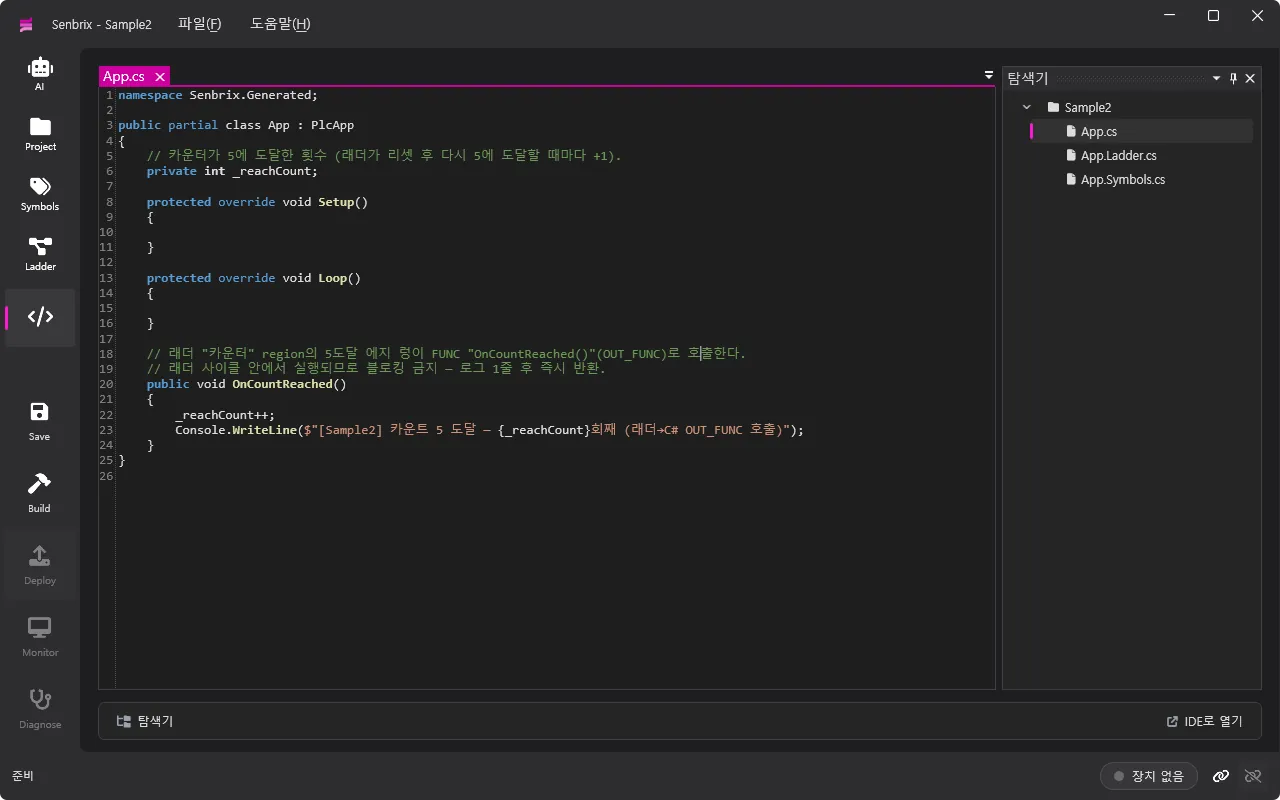
On the receiving end, it looks like this.
public partial class App : PlcApp
{
    // How many times the counter has reached 5 (+1 each time the ladder resets and reaches 5 again).
    private int _reachCount;

    protected override void Setup() { }
    protected override void Loop() { }

    // The reached-5 edge rung of the ladder "counter" group calls this.
    // Runs inside the ladder cycle, so no blocking - one log line, then return.
    public void OnCountReached()
    {
        _reachCount++;
        Console.WriteLine($"[Sample2] Count reached 5 - hit #{_reachCount} (ladder -> C# call)");
    }
}
All the control flow lives in the ladder, so Setup and Loop are left empty. OnCountReached runs inside the cycle, so it bumps one value, writes a log line, and gets out. No await, no blocking.
Swapping without stopping
One of the reasons the shop floor trusts a PLC is that you download a new program without powering down the machine. I built the runtime the same way.
Deployment takes three steps. The editor’s Deploy button calls them in this order.
- start: stop the running app and empty the
Appsfolder. - file: upload the build output (
ladder.jsonand the DLLs). - complete: verify, then start the new app automatically.
At the center of the swap is an app-only loader. A deployed app is loaded into its own AssemblyLoadContext, and that context is created collectible so the whole thing can be torn out. Redeploying means stop the app, tear out this context (Unload), load the new DLL into a new context. The host process stays alive throughout. This is why I had the process hold the doors earlier. Only the app is replaced. The deploy and monitor doors stay as they are.
DLLs are read from file into bytes and loaded from there. No file handle is held, so the next deployment can overwrite the file.
One thing I was careful about: types. The deployed app and the host have to see the same core (Senbrix.Controller), or casting the loaded app to PlcApp does not hold. So that core alone is not loaded by the app loader. It is handed off to the host. If a copy of the core rides along in the payload, it is ignored on purpose. That is what makes the deployed app’s App exactly the same type the host knows.
Whether a torn-out context was actually collected gets checked too. After unloading, it runs GC a few times, and if a generation is still hanging on (which happens when user code holds a thread or a static reference), it counts them. Redeploy over and over and the memory should not leak. This is how I keep an eye on it.
Example - change the limit and redeploy
Change the counter limit in the sample from five to ten, press Deploy again, and the three steps above run again. The Raspberry Pi does not reboot. Only the app gets replaced with the new one, mid-operation, and now 램프2 turns on at ten. The monitor door stays alive through the swap.
It really runs on the Pi
Everything up to here was structure. This time I put it on a real Raspberry Pi and ran it.
On the Pi the runtime is registered as a systemd service.
[Service]
Type=notify
ExecStart=/.../dotnet /.../Senbrix.Runtime.dll
Restart=always
Type=notify means the runtime tells the system when it is ready. Restart=always means a crash or blown memory gets restarted on its own. It is enabled at boot, so applying power is enough: the runtime comes up, and if an app was left there, it runs too.
Here is the state I checked after registering it.
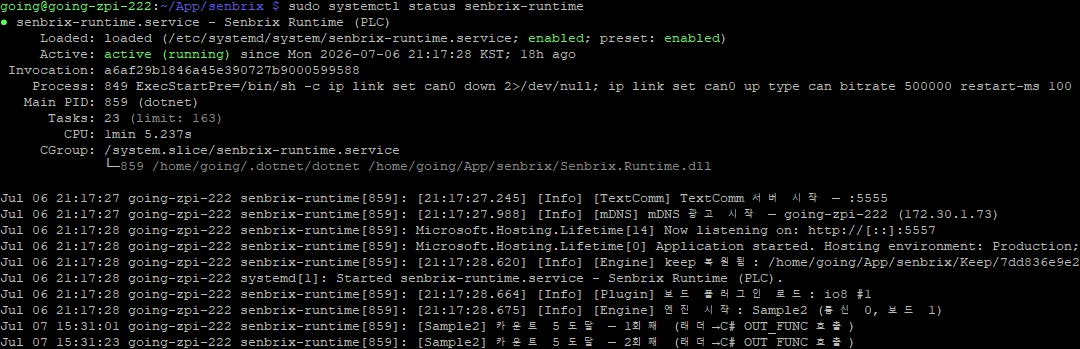
The boot log has everything I have talked about, in order. The monitor (
), mDNS, and deploy () doors open, the keep file is restored, the IO-8 board loads, and the engine starts the app. Only after that does systemd’s start declaration come. That isType=notify doing its job. Logs go to journald, so journalctl lets you trace when it came up and what it did, and the console output from user C#, like the two lines at the bottom, is collected alongside. At the time of the capture it had been up 18 hours with 1 minute of accumulated CPU.
That log had one line about restoring keep. The retain checkbox I set only on the count value back in the app section is this keep. Retained values are guarded by a separate thread. It does not touch the 10 ms scan. It reads the memory buffer directly, and when a value changes, it waits for about 3 seconds of quiet and then writes to file (if nothing changes for a long stretch, it still writes at least once every 30 seconds). A write goes to a temporary file, gets flushed all the way to disk, and is then renamed into place, so losing power mid-write does not corrupt the file. On restore, values come back only if the project and signature match and the hash checks out. The retain area a shop-floor PLC guards with a battery, this one guards with a file.
I/O attaches over CAN. The IO-8 board hangs off the CAN bus into the runtime, so pressing a button brings an input in and writing an output clicks a relay. The runtime holds this bus too, so it survives an app swap.
And you watch it live. Once the editor attaches to the monitor door (
) and turns monitoring on, the runtime starts collecting a value snapshot at the end of every cycle. The editor keeps receiving those snapshots and paints them on screen. A contact conducts and its color changes. Timer and counter values show up in real time.Example - live demo on hardware
I deployed the sample app and checked it against the board’s buttons and lamps.
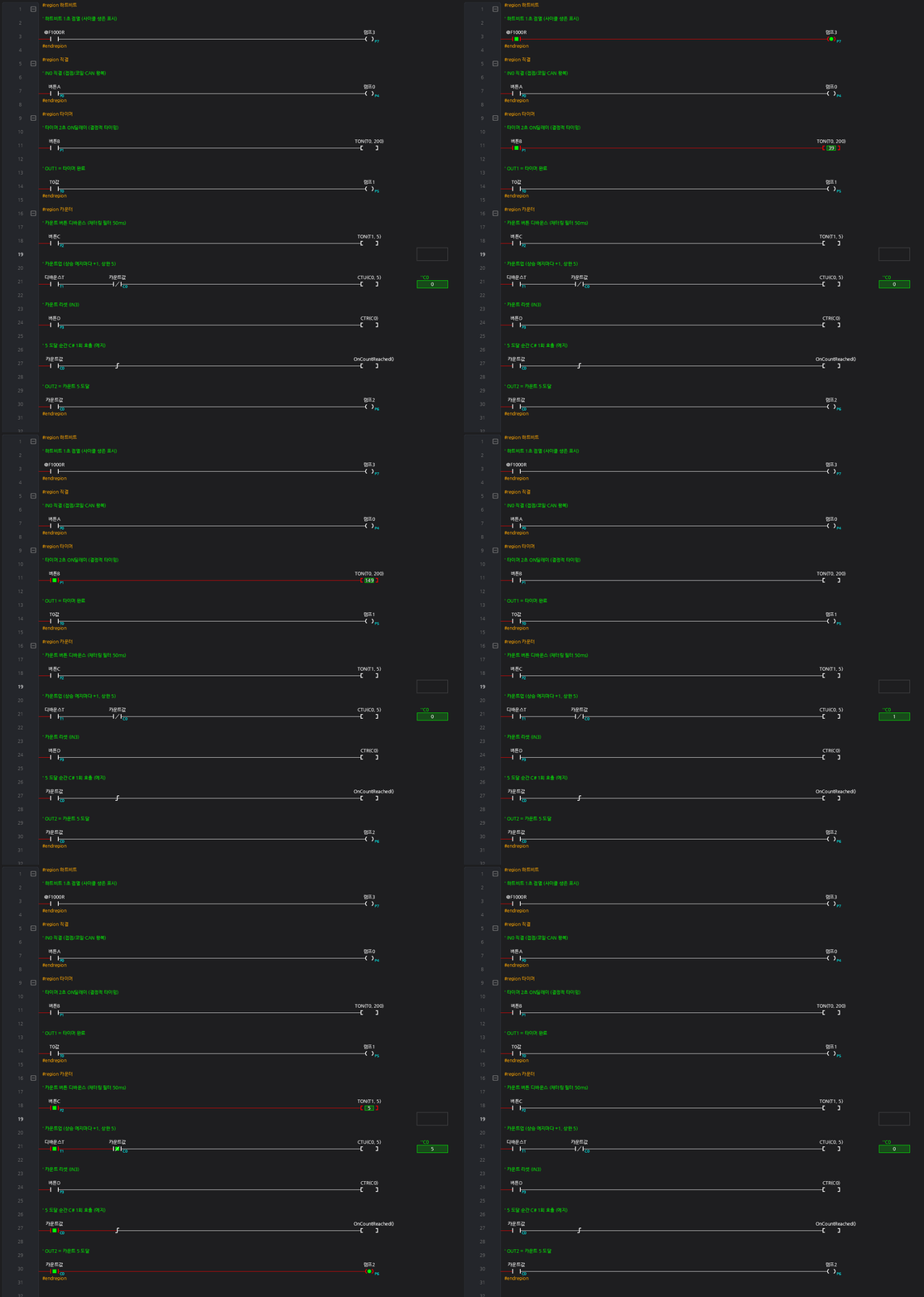
The heartbeat lamp blinks every second. Press 버튼A and 램프0 follows. Hold 버튼B and the timer value climbs until 램프1 turns on at 2 seconds. Every press of 버튼C bumps the count by one, and at five 램프2 turns on and the C# log line appears. Those are the two lines at the end of the journald capture above. Count up to four, reboot the device, and the runtime comes up on its own, the app runs, and the count picks up from four. The ladder you wrote runs on a Raspberry Pi.
Wrapping up
Apply power and systemd brings up the runtime, and the app left on it starts automatically. The app runs deterministically on a 10 ms period, and the user’s C# runs on its own beside it. A line of logic can throw and the controller keeps going. Changing the program means swapping only the app, with the power on. Power drops and comes back, and the retained values are still there. And the editor gets all of it back live, to watch. That is how the five points from the intro were covered.
At the end of Part 3 I said actually running it on the Raspberry Pi was for the next part. This part ran it.
Next - AI writes the ladder
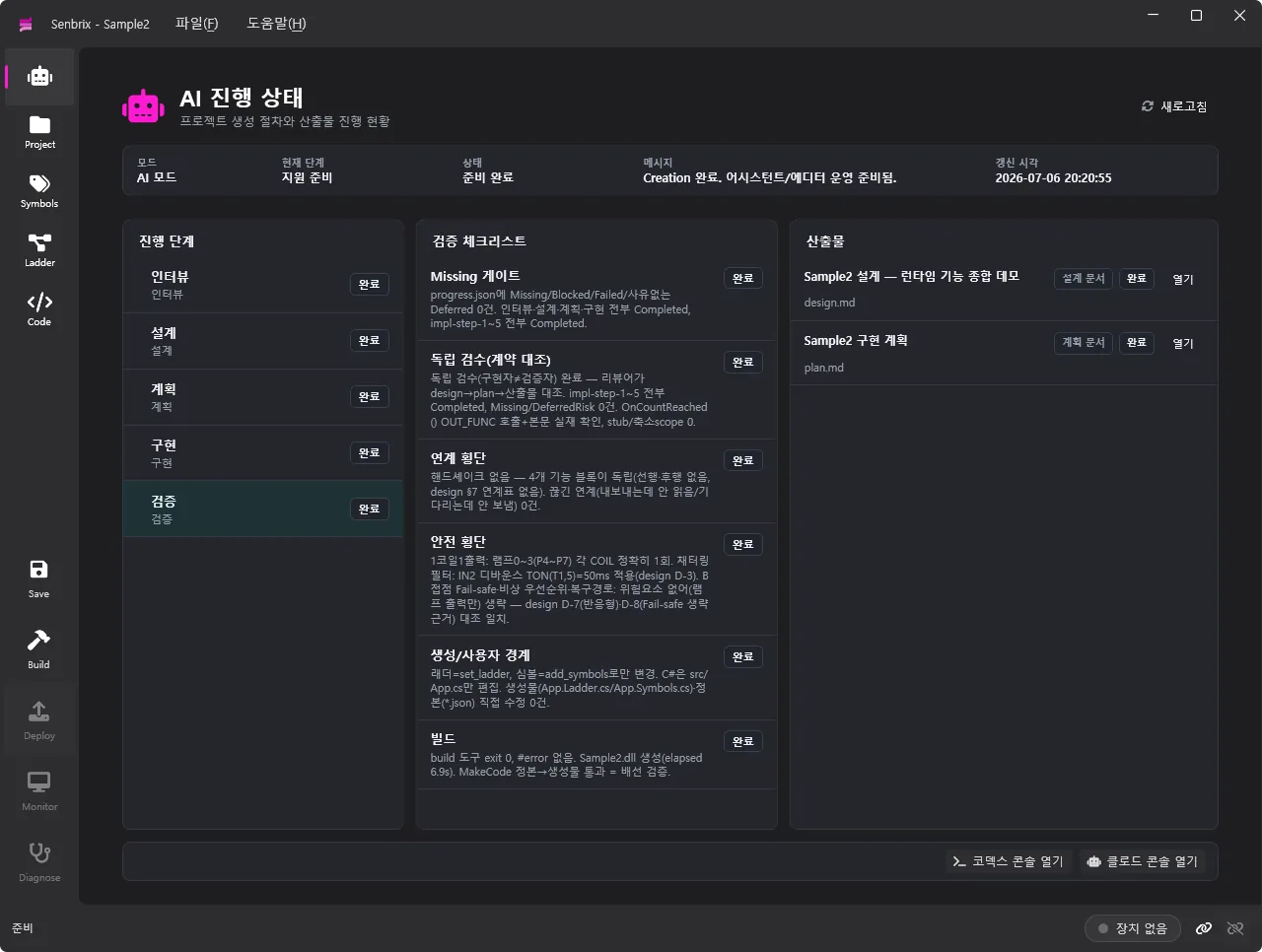
Truth is, the ladder in this sample was written by AI, on my instructions. The next part is about how the AI writes ladder, and how it supports ladder authoring and code work.
Comments
Enter a nickname to leave a comment, or sign in with Google or GitHub.