
While cleaning out some old project folders, we came across something fun. It’s footage and screenshots from 2016, when we developed the operating software for GDI Korea’s motion simulator, the G-Roller Coaster. Picture a yellow robot arm with two seats on the end, carrying riders and tilting and turning them in time with a game on screen.
Our part was the PC software that runs the machine. Pick a game, start it, and the movement inside the game carries straight through to the seats. We also gave operators a way to move and stop the machine by hand.

Filmed in November 2016, playing at roughly 3× speed.
One button from start to stop
The main screen shows the selected content and a large Game Start button. Press it and the game launches while the machine starts running. Close the game and the machine stops too, so the operator never has to manage the two separately.
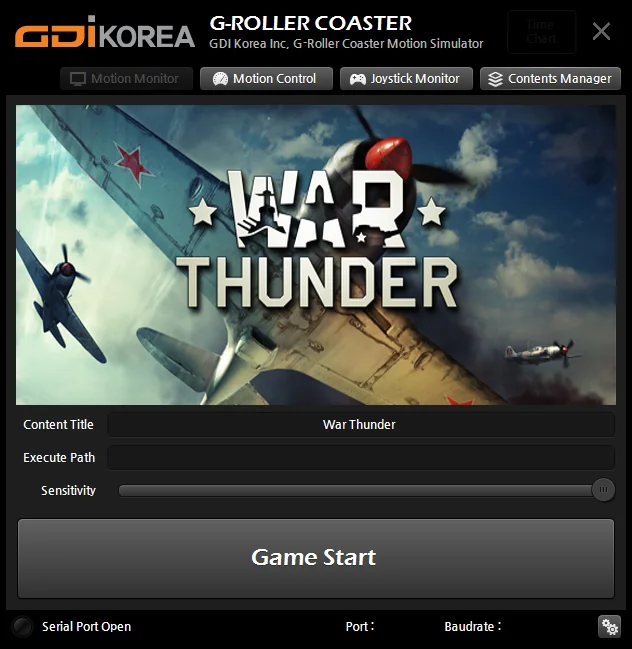
A Sensitivity slider on the main screen sets how large the movements are. The same game can run gentler or bigger depending on the riders and the situation.
Swappable game content
What a simulator feels like depends on which game it runs. So the Game Contents Manager lets operators add, edit and remove content, and choose which one to run next.
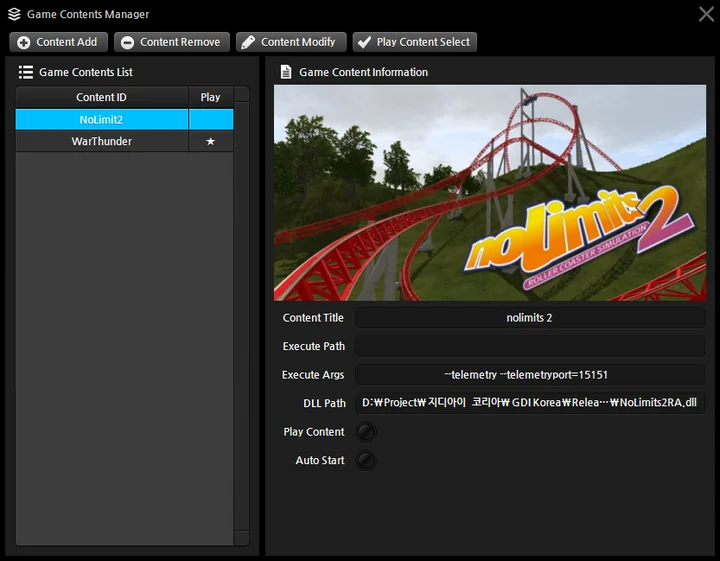
Each entry has its own executable path, launch options and integration module. An Auto Start option launches the chosen content as soon as the program opens.
Integration modules are built per game. We connected NoLimits 2 (a roller coaster simulation), War Thunder (a flight game), Dirt 3 (a racing game) and SimTools (software made for motion simulators), among others. Supporting a new game just means adding a module.
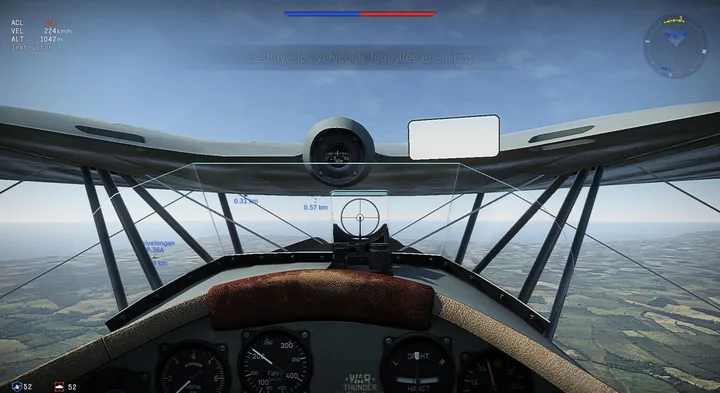
How game movement reaches the seats
Every game exposes its movement data differently. The integration module pulls values such as tilt, heading and altitude from the game. The operating software turns them into the four movements the machine understands and sends them in a steady, rapid stream.
Passing game values through untouched causes trouble. A long turn in a plane pins the seats against one end of their travel. And when the heading crosses 180 degrees, the value flips to the other side and the seats lurch. So each axis gets a filter that smooths its movement.
The idea is simple. React strongly to the moment a value changes, not to the value itself, and while the motion continues, ease the seats back toward center a little at a time. Riders feel the start of every bank clearly, and the seats win back room for the next move. Motion simulator builders call this washout.
Each game also got its own touches.
| Game | Effect |
|---|---|
| War Thunder | Firing the machine guns adds a light shake to the seats to mimic recoil |
| NoLimits 2 | When the coaster rolls over sideways, the seats keep rotating the same way |
| Both | For a few seconds after the game starts, some movements are held still so the launch isn’t jerky |
How strongly each axis responds is saved as a per-game setting, so it can be tuned to the machine and the content.
Motion Control for hands-on operation
The Motion Control screen lets operators move the machine without a game. Roll (side-to-side tilt), Pitch (front-to-back tilt), Yaw (turning left and right) and Heave (up and down) can each be moved one at a time with sliders.
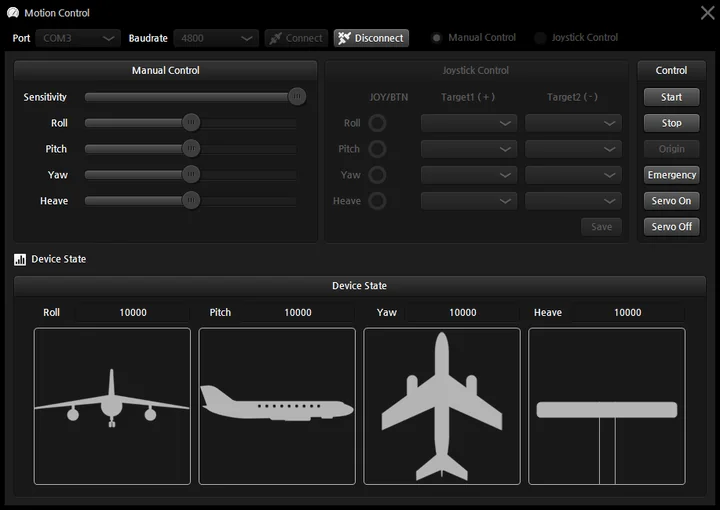
Joysticks work too. Map the stick axes and buttons to each movement and you can steer the machine by hand. The Device State panel at the bottom shows the current value of all four movements next to an aircraft silhouette.
Buttons on the right handle Start, Stop, Origin (return to home position), Emergency, and Servo On/Off. The servos are the motors that drive the robot arm’s joints.
Safety hotkeys that work mid-ride
When a game fills the screen, there’s no time to hunt for the operating software’s window. So the machine can be handled with keyboard shortcuts while the game is running.
| Shortcut | Action |
|---|---|
| Ctrl + F8 | Return to origin |
| Ctrl + F9 | Stop |
| Ctrl + F10 | Emergency stop |
| Ctrl + F11 | Lock safety bar |
| Ctrl + F12 | Release safety bar |
Run-time logging
The software automatically records how long the servos were on and how long the machine actually ran. The log is shown over time on a chart screen opened with an administrator password, which helps track how much the machine has been used and plan maintenance.
Wrapping up
So, to recap:
- Pick a game and press Game Start once; the game and the machine move together.
- Per-game integration modules let operators switch content.
- Per-axis filters smooth the game’s movement so the seats feel real without hitting their limits.
- The Motion Control screen and a joystick drive all four movements by hand.
- Hotkeys handle emergency stop and the safety bar mid-ride.
- Servo-on time and run time are logged automatically.
Comments
Enter a nickname to leave a comment, or sign in with Google or GitHub.