
When a machine misbehaves, the first question is always “where’s the problem?” And the tag that raised the alarm is rarely the answer. A hot boiler doesn’t mean a broken boiler.
Senapse is an IT-OT gateway we’re building to work through that question with AI. It collects values from field equipment and lets an AI read them and reason about causes. This post is the log of a simulated test we ran with it.
What Senapse does
Senapse sits between field devices and an AI. Toward the devices it reads values over Modbus. Toward the AI it exposes tools over MCP (Model Context Protocol, the standard way an AI calls external tools).
| Part | Role |
|---|---|
| Collection | Reads devices over Modbus TCP/RTU and maps registers to tags |
| History | Stores tag values in a time-series database |
| Dashboard | Web console with live values, quality and recent trends |
| MCP tools | Lets the AI search tags, query history, propose configs and run write tests |
| Human approval | Config changes and write access always need a person to approve |
The rule behind all of it: the AI can propose and read, but only a human can let it change anything.
The setup: a fault with a hidden answer
Two simulated machines. A boiler heats water; a cooling pump keeps the loop cool. We tied them together with a simple physics model, so when pump flow drops, the boiler runs hotter.
| Machine | Tags |
|---|---|
| Boiler | Temp PV, temp SV, steam pressure, burner output, running |
| Cooling pump | Motor current, flow, vibration, discharge pressure, running, speed command (writable) |
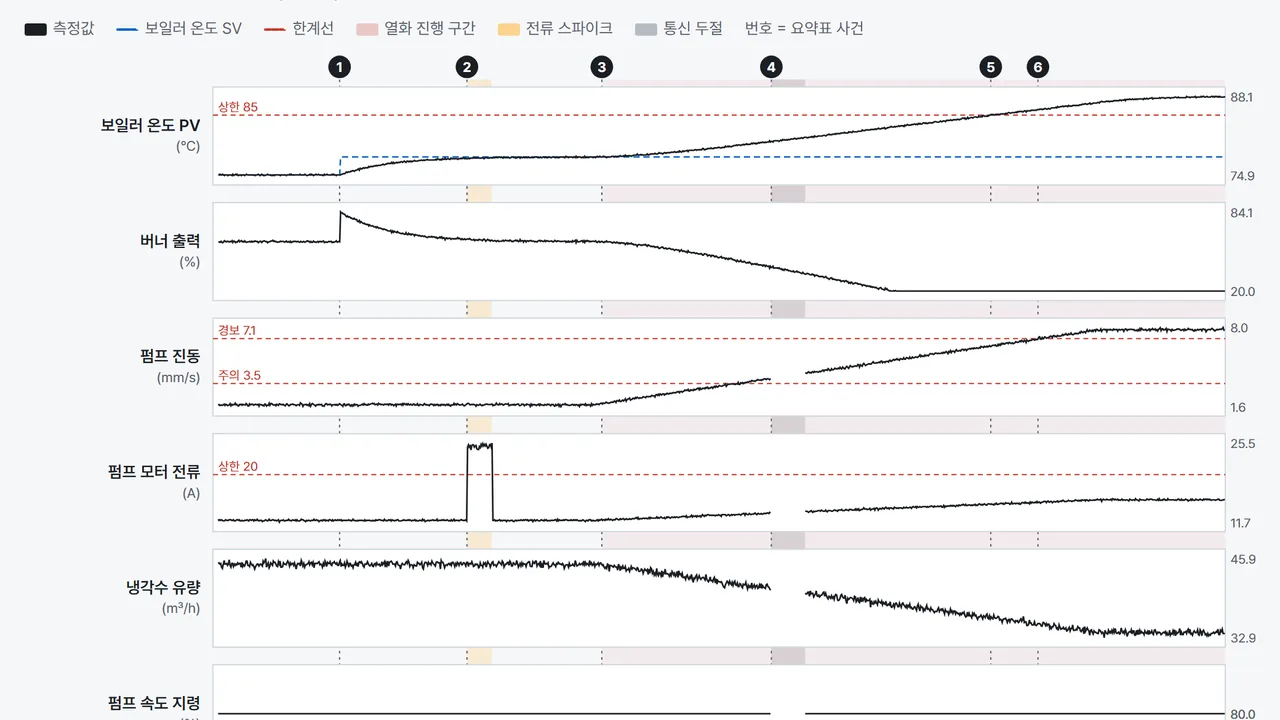
Then we planted a 20-minute fault scenario. The real cause is pump bearing wear: vibration climbs, current rises, flow falls, and the boiler overheats. A few unrelated events were mixed in as distractions.
| Time | Event | What the AI has to figure out |
|---|---|---|
| +2.5 min | Boiler setpoint 75 to 78 °C | Normal operator action, not a fault |
| +5 min | 30-second pump current spike | One-off, unrelated to the wear |
| +7.5 min | Bearing wear begins | The root cause |
| +11 min | 40-second pump comms dropout | A window to exclude from analysis |
| ~+15 min | Boiler temp passes its 85 °C limit | The symptom |
The AI never saw this table. It got what an operator would know: what each machine does, normal ranges, and rules like “less coolant flow means a hotter boiler.”
1. Setup: the AI proposes, a person approves
We let the AI register the devices too. It read the register map and submitted a draft for two devices and 11 tags over MCP.
The gateway immediately runs a read-back check on every draft. It reads real values at the proposed addresses and flags anything that looks like a wrong scale or byte order. All 11 tags came back as a match.
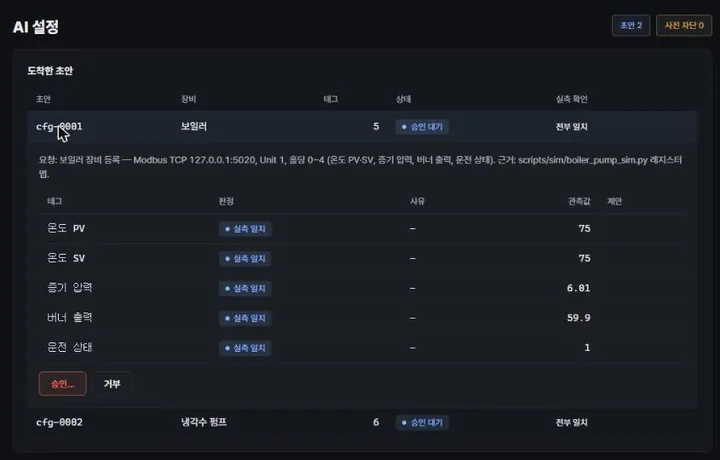
The AI’s boiler draft. Each tag carries the value actually read and a verdict. Nothing applies until a person approves it.
Approval takes two clicks. One stray click won’t change a thing.
2. Watching: the dashboard over 20 minutes
The dashboard tracked every event as it happened. The current spike turned that tag to warning; the comms dropout turned the whole pump card red.
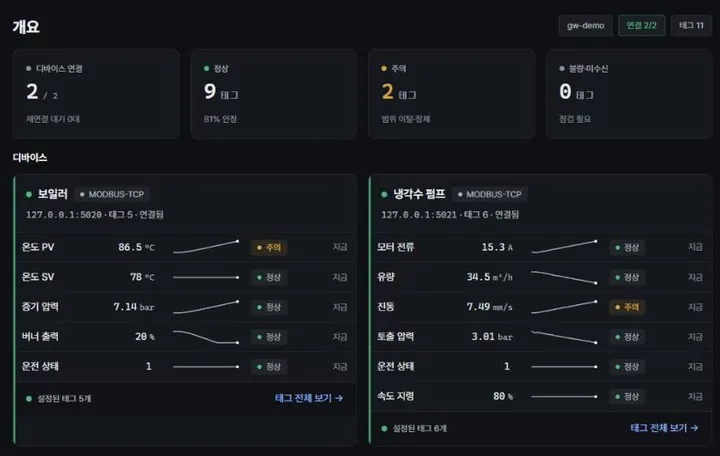
Right after the boiler crossed its limit. Burner output is pinned at its 20% floor, and the pump trend lines show vibration and current rising while flow falls.
But a dashboard only gets you to “the boiler is hot.” It won’t tell you why. That’s the part we handed to the AI.
3. Analysis: the AI report
Once the scenario ended, we asked the AI to analyze the 20-minute window. It pulled raw history for all 11 tags over MCP, split the quality codes by reason, and wrote an HTML report.
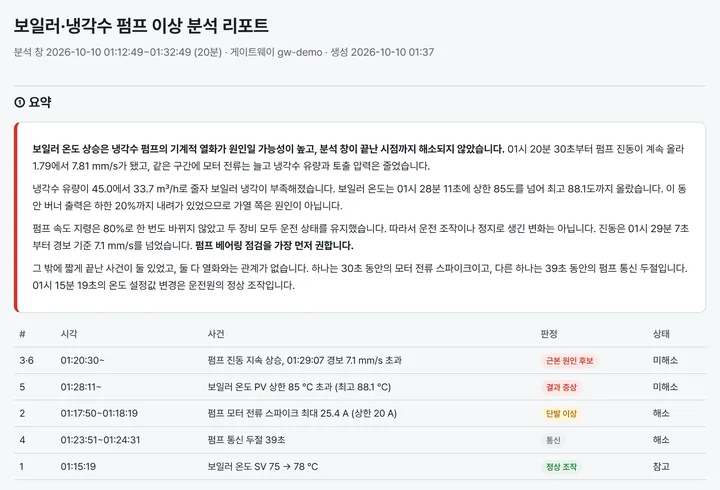
The report leads with the verdict. The overheat most likely comes from mechanical wear in the cooling pump, and it hasn’t cleared. Every event gets a label, and the setpoint change is filed as a normal operator action.
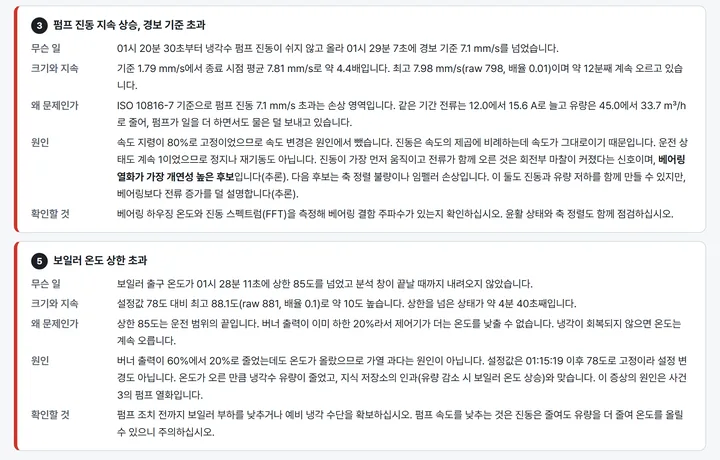
It started by crossing off what the data could rule out:
- The speed command sat at 80% the whole time, so a speed change isn’t it
- Burner output dropped from 60% to 20% while the temperature rose, so overfiring isn’t it
- Both machines kept running, so it isn’t a stop or restart
From what was left, it called bearing wear the most likely cause and said plainly that this was an inference. It also noted the limit: without a vibration spectrum, the data can’t tell a bad bearing from a misaligned shaft.
Scoring
We compared its findings with the answer key.
| Event | Answer | AI found | Off by |
|---|---|---|---|
| Setpoint change | 01:15 | 01:15, labeled normal action | 0 s |
| Current spike | 01:17 | 01:17, ruled unrelated | 1 s |
| Bearing wear starts | 01:20 | 01:20 | 11 s |
| Comms dropout | 01:23 | 01:23, window excluded | 2 s |
| Temp limit crossed | 01:28 | 01:28, labeled symptom | 1 s |
| Root cause | Pump bearing wear | Bearing wear most likely (inferred) | Match |
Six for six. The 11-second lag on the wear onset comes from the detector waiting for the trend to clear the noise before calling it.
4. Experiment: testing the hypothesis in an armed session
Sometimes watching isn’t enough and you have to poke the system. Senapse does this through an armed session: write access opened briefly, limited to specific tags and a time window.
The AI asked to drop the speed command from 80% to 70% for a moment and see whether vibration fell with the square of speed. If the cause is rotational, it should.
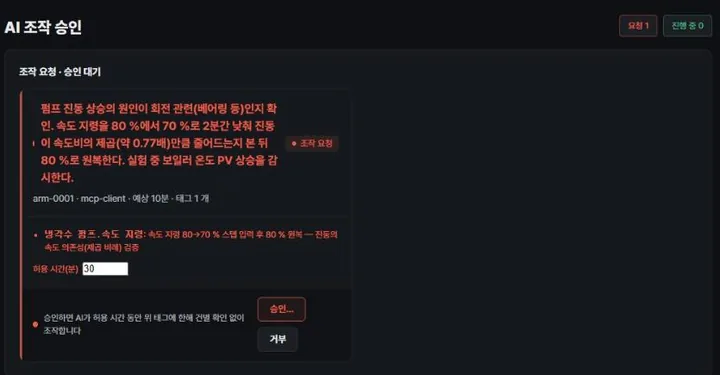
The armed-session request. It lists the purpose, the tag it wants to touch and why. A person sets the time limit and approves.
After approval, the AI logged its prediction first, then wrote. It ignored the register read-back right after the write. That only proves a value landed in the register, not that the machine reacted. It checked the response a minute later on separate tags instead.
| Tag | Before (80%) | Predicted (70%) | Measured (70%) |
|---|---|---|---|
| Vibration | 7.83 mm/s | ~6.0 (×0.766) | 5.98 (×0.764) |
| Flow | 33.4 m³/h | ~29.2 | 29.3 |
| Motor current | 15.8 A | ~12.9 | 12.8 |
| Boiler temp | 88.0 °C | rises | 90.7 |
Vibration fell right on prediction, which backs the rotational-cause theory. Flow fell too, and the boiler got hotter. So slowing the pump down isn’t a fix. The AI set the speed back to 80%, confirmed the restore with a separate read, and released the session.
What the test exposed
It was a simulation, but it still caught real bugs in the product.
Write values typed as strings. With some AI clients, the value 70 went out as a string instead of a number, and the gateway rejected it. The tool definition was missing a type for that field. During the test we worked around it by calling the same tool directly with a real number. Right after, we added number and boolean types to the tool definition, and the AI now sends numbers as numbers.
Stale read-back after a write. The read-back in the write response sometimes showed the old value, because it read before the device updated the register. The AI’s analysis rules already said “never judge by the read-back right after a write,” and this time that rule earned its keep. The AI ignored the number and checked the response on separate tags a minute later.
Header refresh. The device status in the top header only updated after navigating to another page.
What it isn’t yet
The same team wrote the exam and took it. The scenario spreads the pump fault cleanly, so it doesn’t capture real-plant noise or several causes overlapping at once.
The simulator’s physics is simple too. Vibration scales with speed squared and flow with speed. There’s no real pump curve and no bearing defect frequencies. That’s also why the experiment landed so close to the prediction.
Still, we saw the loop we wanted to see. The AI proposes a setup, a person approves it, the AI narrows the cause from collected data, then runs a permitted experiment to check its hypothesis. Next up: running the same loop on real equipment.
Contact
- Email : [email protected]
- Insta : https://www.instagram.com/going.sen/
- Website : https://intosen.com/kr/consult/
Comments
Enter a nickname to leave a comment, or sign in with Google or GitHub.