

SEN
Senbrix

Turn Raspberry Pi into a PLC.
Use ladder logic and C# together.

Senbrix is a PLC development environment for Raspberry Pi. Build operating sequences in ladder logic, and add C# for calculations, web APIs or database access when you need them. Both languages share variables, so machine control and data processing work in one program.

A ladder rung passing through a C# code block to reach a database and a server
Runtime boardRaspberry Pi
LanguagesLadder · C#
CommunicationModbus RTU / TCP
AI authoring · diagnosticsClaude · Codex

See the workflow

Describe how your machine should work.
Build the ladder logic with AI.

Create ladder logic for the sequence you need, edit it yourself and watch it run.

Generated ladder · Worked example

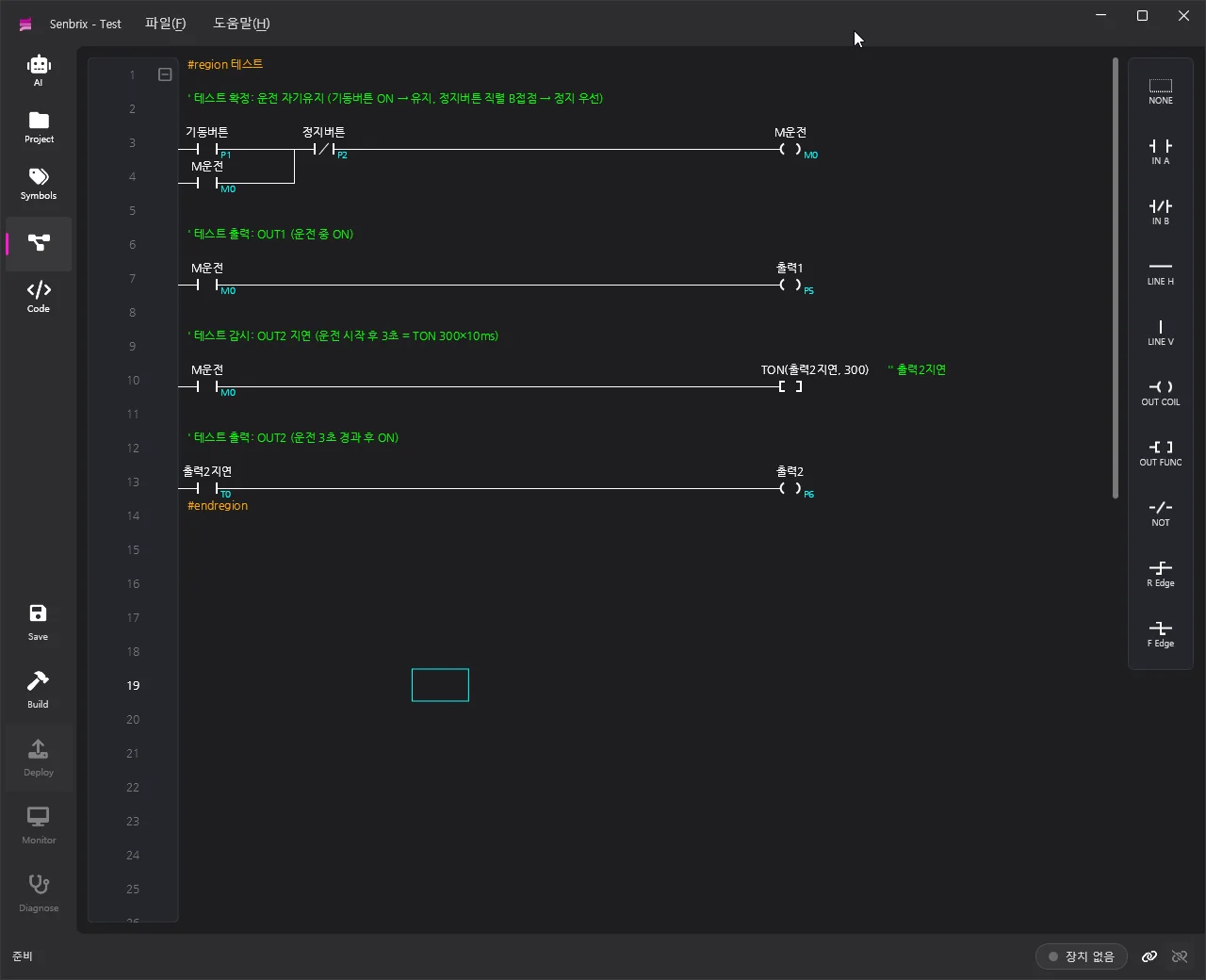
A seal-in circuit with a 3-second delay.
Review the ladder logic AI generates and make your own changes.

Follow the full tutorial ↗
Four ladder rungs generated by AI
AI-generated ladder logic with a seal-in circuit and a 3-second delay timer
Compare the logic you wrote with its running state in the same ladder diagram. Click the image to enlarge it.

Connect machine controls to web data and databases.

Build your operating sequence in ladder logic. When you need calculations, web APIs or database access, you can add C# functions with AI. Both languages share variables, so ladder conditions can use the data directly.

See a fan controlled by temperature data from a web API →

Get started

Start with your own Raspberry Pi.
The tools and runtime are free.

For prototypes and delivered equipment

Add more machines
without per-device runtime fees.

The development tools and runtime are free. Whether you are testing one prototype or delivering multiple machines, there is no software license fee per device.

Download the free editor →Hardware and external AI services are charged separately.


Use a Raspberry Pi you already own

One install command.
Your Raspberry Pi becomes a PLC.

Run this command in a Raspberry Pi OS terminal.
The script installs the .NET runtime and registers the Senbrix service.

Tested on 64-bit Raspberry Pi OS
curl -sSL https://raw.githubusercontent.com/going-kr/Release.Senbrix/master/install-runtime.sh | sudo bash
Read the install script ↗Board setup guide ↗

02Specifications

More on the blog →
Specification posts are in preparationSupported boards, I/O expansion and communication specs are coming soon on the blog.

03Applications

More on the blog →
LoadingFetching posts from the blog.

Tell us what you'll control

Give us the target and the I/O count, and we'll suggest a board configuration and a quote.